From Examine to Umbraco Search

Umbraco Search reached another milestone last week: It’s now a part of Umbraco CMS, starting from Umbraco 19 🚀
That means it’s high time to begin migrating your sites from Examine to Umbraco Search. Fortunately, the migration of an existing site can be performed in-place, with practically no extra overhead when moving past the Umbraco 19 mark.
It just takes a little planning 📋
Umbraco 17
Let’s start with an implementation of content search in Umbraco 17. Following the quick-start from the Umbraco docs, it might look something like this:
[ApiController]
[Route("api/[controller]")]
public class SearchController : ControllerBase
{
    private readonly IExamineManager _examineManager;
    private readonly UmbracoHelper _umbracoHelper;

    public SearchController(IExamineManager examineManager, UmbracoHelper umbracoHelper)
    {
        _examineManager = examineManager;
        _umbracoHelper = umbracoHelper;
    }

    [HttpGet("examine-manager")]
    public IActionResult SearchWithExamineManager(string query)
    {
        if (query.IsNullOrWhiteSpace())
        {
            return BadRequest("No query");
        }

        if (_examineManager.TryGetIndex(
                Constants.UmbracoIndexes.ExternalIndexName,
                out var index) is false)
        {
            return Problem("Index not found");
        }

        var ids = index
            .Searcher
            .CreateQuery("content")
            .NodeTypeAlias("page")
            .And()
            .Field("nodeName", query)
            .Execute(QueryOptions.SkipTake(0, 10))
            .Select(x => x.Id);

        var documentNames = ids
            .Select(id => _umbracoHelper.Content(id)?.Name)
            .WhereNotNull()
            .ToArray();

        return Ok(documentNames);
    }
}
Essentially, grab the target search index with the IExamineManager and then query it using Examine’s fluent API.
A more simplistic approach also exists, using the IPublishedContentQuery:
[ApiController]
[Route("api/[controller]")]
public class SearchController : ControllerBase
{
    private readonly IPublishedContentQuery _publishedContentQuery;

    public SearchController(IPublishedContentQuery publishedContentQuery)
        => _publishedContentQuery = publishedContentQuery;

    [HttpGet("content-query")]
    public IActionResult SearchWithPublishedContentQuery(string query)
    {
        if (query.IsNullOrWhiteSpace())
        {
            return BadRequest("No query");
        }

        var result = _publishedContentQuery.Search(query);

        var documentNames = result
            .Select(r => r.Content.Name)
            .ToArray();

        return Ok(documentNames);
    }
}
… but I wouldn’t recommend this. The lack of granularity at query time means you end up having to perform post-filtering, sorting and pagination in memory after materializing the published content, which is a really expensive approach.
Umbraco 17 with Umbraco Search
The first step in migrating to Umbraco Search is… to start utilizing it 😆
Umbraco Search ships as an add-on for Umbraco 17 and 18 for one specific reason; it allows for an in-place migration of an existing site, before upgrading to (or beyond) Umbraco 19.
Following the installation instructions, first add the Umbraco Search core, the Examine provider, and the backoffice integration from NuGet:
dotnet package add Umbraco.Cms.Search.Core
dotnet package add Umbraco.Cms.Search.Provider.Examine
dotnet package add Umbraco.Cms.Search.BackOffice
Now add a composer to wire up Umbraco Search:
namespace V17UmbracoSearch.DependencyInjection;

public sealed class SiteComposer : IComposer
{
    public void Compose(IUmbracoBuilder builder)
    {
        builder
            // add core services for search abstractions
            .AddSearchCore()
            // use Umbraco Search for backoffice search
            .AddBackOfficeSearch()
            // add the Examine search provider
            .AddExamineSearchProvider();

        // optimize server resources by disabling the (now-unused) V17 Examine indexes
        builder.DisableDefaultExamineIndexes();
    }
}
Since I won’t be using the default Examine indexes moving forward, I have opted to disable them entirely, in order to optimize server resources.
The getting started documentation for Umbraco Search contains almost everything needed to replace the Examine implementation; replace IExamineManager with ISearcher and use the Umbraco Search API instead of the fluent API from Examine.
The missing link is the ability to filter by content type alias.
The Examine indexes in Umbraco 17 include the content type alias for filtering. This is what powers the .NodeTypeAlias("page") in the previous code sample.
Umbraco Search only indexes the content type ID (key). To preserve the querying functionality, the content type ID must be resolved from its alias ("page") at runtime. Enter the IPublishedContentTypeCache service.
[ApiController]
[Route("api/[controller]")]
public class SearchController : ControllerBase
{
    private readonly ISearcher _searcher;
    private readonly UmbracoHelper _umbracoHelper;
    private readonly IPublishedContentTypeCache _publishedContentTypeCache;

    public SearchController(
        ISearcher searcher,
        UmbracoHelper umbracoHelper,
        IPublishedContentTypeCache publishedContentTypeCache)
    {
        _searcher = searcher;
        _umbracoHelper = umbracoHelper;
        _publishedContentTypeCache = publishedContentTypeCache;
    }

    [HttpGet("umbraco-search")]
    public async Task<IActionResult> SearchWithUmbracoSearch(string query)
    {
        if (query.IsNullOrWhiteSpace())
        {
            return BadRequest("No query");
        }

        // Umbraco Search only indexes the content type key for filtering,
        // so let's resolve the alias from cache
        var pageContentTypeKey = _publishedContentTypeCache
            .Get(PublishedItemType.Content, "page")
            .Key;

        var result = await _searcher.SearchAsync(
            indexAlias: Umbraco.Cms.Search.Core.Constants.IndexAliases.PublishedContent,
            filters: [
                // add filter for doctype "page"
                new KeywordFilter(
                    Umbraco.Cms.Search.Core.Constants.FieldNames.ContentTypeId,
                    [pageContentTypeKey.AsKeyword()],
                    Negate: false
                ),
                // use query to filter for content name
                new TextFilter(
                    Umbraco.Cms.Search.Core.Constants.FieldNames.Name,
                    [query],
                    Negate: false
                )
            ]
        );

        var ids = result.Documents.Select(document => document.Id);

        var documentNames = ids
            .Select(id => _umbracoHelper.Content(id)?.Name)
            .WhereNotNull()
            .ToArray();

        return Ok(documentNames);
    }
}
That’s quite straightforward, I think. Obviously, your mileage may vary, depending on the complexity of the Examine query you’re trying to replace 😉
However, the IPublishedContentQuery querying approach is entirely broken now:
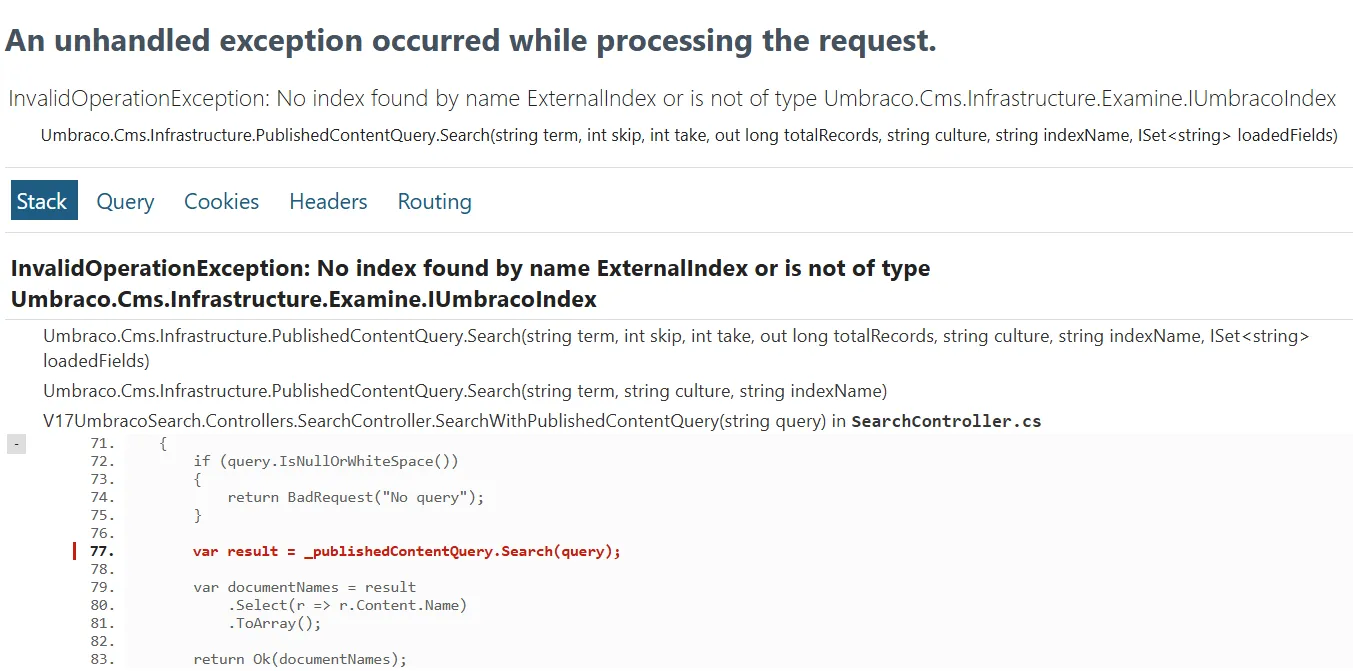
The cryptic error message:
"No index found by name ExternalIndex or is not of type Umbraco.Cms.Infrastructure.Examine.IUmbracoIndex"
…is actually a product of me disabling the default Examine indexes 🙄
I do stand by that decision, though, for a few reasons:
- Server resource optimization: If it can be avoided, there is no reason to keep the default Examine indexes alive in parallel with the Umbraco Search indexes.
- Risk of drift: Umbraco Search carries its own logic to keep indexes up to date with content changes. This can potentially drift from the Umbraco equivalent, causing inconsistency in search results.
As it turns out, the Umbraco Search powered replacement is super simple, because of the unbounded and unfiltered nature of IPublishedContentQuery:
[ApiController]
[Route("api/[controller]")]
public class SearchController : ControllerBase
{
    private readonly ISearcher _searcher;
    private readonly UmbracoHelper _umbracoHelper;

    public SearchController(ISearcher searcher, UmbracoHelper umbracoHelper)
    {
        _searcher = searcher;
        _umbracoHelper = umbracoHelper;
    }

    [HttpGet("content-query")]
    public async Task<IActionResult> SearchWithPublishedContentQuery(string query)
    {
        if (query.IsNullOrWhiteSpace())
        {
            return BadRequest("No query");
        }

        var result = await _searcher.SearchAsync(
            indexAlias: Umbraco.Cms.Search.Core.Constants.IndexAliases.PublishedContent,
            query: query,
            take: int.MaxValue
        );

        var ids = result.Documents.Select(document => document.Id);

        var documentNames = ids
            .Select(id => _umbracoHelper.Content(id)?.Name)
            .WhereNotNull()
            .ToArray();

        return Ok(documentNames);
    }
}
…and just to be clear: I don’t recommend this approach either. You should always perform filtering and pagination at query time, not as an in-memory operation on a potentially massive result set.
Umbraco 19 and beyond
Now that my search implementation has been decoupled from Examine, the site can be upgraded to Umbraco 19+ without loosing search functionality.
First thing’s first, though. The Umbraco Search add-on must be uninstalled, since there is no Umbraco 19+ equivalent of those NuGet packages:
dotnet package remove Umbraco.Cms.Search.Core
dotnet package remove Umbraco.Cms.Search.Provider.Examine
dotnet package remove Umbraco.Cms.Search.BackOffice
Now the Umbraco.Cms NuGet package can be upgraded to 19+. This restores the Umbraco Search functionality as an integral part of the CMS core.
The default Examine indexes from the previous Umbraco versions are no longer maintained, so the DisableDefaultExamineIndexes() option does not exist in Umbraco 19. That line can safely be removed.
Depending on your implementation, you may also need to adjust some using declarations after upgrading, but as a whole, all the functionality from Umbraco Search can be found in the CMS core.
It bears mentioning that IPublishedContentQuery.Search() works out of the box with Umbraco 19+. The sample code in the GitHub repo reflects this… but I still don’t recommend using it 🙃
Umbraco Search is coming 👏
There are no two ways around it: Umbraco Search is coming your way, sooner or later. The sooner you start preparing for it, the better off you’ll be.
Hopefully, this post helps set your mind at ease. Yes, it’s a new thing, but it doesn’t have to be that scary.
The upside to all this is a vastly improved feature set for search. You should check out some of my previous posts (I’ve written a lot on the subject), and of course the official documentation.
As a closing remark, it’s worth mentioning that Examine still powers search in Umbraco 19+ by default. If your implementation relies heavily on custom Examine (or raw Lucene) querying, you can still resolve the IExamineManager and go from there. You’ll have to adjust your implementation to the new index format, but it might be a shortcut all the same.
Happy upgrading 💜